What Is a PDF File?
If you've ever downloaded an invoice, signed a contract, submitted a resume, or shared an important document, chances are you've worked with a PDF file. Despite being one of the most widely used digital document formats in the world, many people still wonder what a PDF actually is, how it works, and why it has become the standard format for sharing documents across different devices and operating systems.
Whether you're a student sending assignments, a business professional exchanging reports, or someone who simply wants to organize personal files, understanding the PDF format can help you work more efficiently while keeping your documents consistent, secure, and easy to share.
In this guide, you'll learn everything you need to know about PDF files—from their history and technical foundations to their advantages, limitations, and everyday uses. You'll also discover how to edit, compress, merge, convert, protect, and sign PDF documents using modern browser-based tools without installing additional software.
By the end of this article, you'll have a solid understanding of why PDF remains the preferred document format for millions of individuals, businesses, educational institutions, and governments around the world.
Quick Answer
A PDF (Portable Document Format) is a digital file format designed to display documents exactly as their creator intended, regardless of the device, operating system, or software used to open them.
Unlike editable document formats such as Microsoft Word, a PDF displays the same content consistently whether it is viewed on Windows, macOS, Linux, Android, or iOS. This consistency makes PDF the preferred format for contracts, invoices, manuals, forms, reports, academic papers, and official documents.
Modern PDF files can also include advanced features such as:
- High-quality text and images
- Clickable hyperlinks
- Interactive forms
- Digital signatures
- Password protection
- Annotations and comments
- Embedded fonts
- Bookmarks and navigation
- Metadata
- Accessibility features for screen readers
Because of its reliability and compatibility, PDF has become the global standard for sharing documents electronically.
Table of Contents
- What Does PDF Stand For?
- What Is a PDF File?
- The History of PDF
- PDF Timeline
- Key Takeaways
- Why Was PDF Created?
- How PDF Files Work
- Inside a PDF Document
- Why PDF Became an Industry Standard
- Advantages of PDF
- Disadvantages of PDF
- Common Uses of PDF Files
- Who Uses PDF?
- PDF vs Microsoft Word
- PDF vs JPG
- PDF vs PNG
- Can PDF Files Be Edited?
- How to Open PDF Files
- How to Create PDF Files
- How to Compress PDF Files
- How to Protect PDF Files
- How to Sign PDF Documents
- Best Practices
- Common Mistakes
- Frequently Asked Questions
- Related SmokePDF Tools
- Related Articles
- Conclusion
What Does PDF Stand For?
PDF stands for Portable Document Format.
The word Portable refers to the format's ability to preserve the exact appearance of a document regardless of where it is opened. Whether the recipient uses Windows, macOS, Linux, Android, or iOS, the document will look the same.
The term Document represents any digital file containing information such as text, images, tables, graphics, forms, or diagrams.
Finally, Format refers to the standardized structure used to store and display that information consistently across different software applications and devices.
Together, the name Portable Document Format perfectly describes its purpose: a document format that can be moved, shared, and viewed anywhere without changing its layout or appearance.
This consistency is one of the primary reasons why PDF has become the preferred format for official documents, business reports, legal contracts, educational materials, and digital publications worldwide.
What Is a PDF File?
A PDF (Portable Document Format) is a digital file format designed to display documents exactly as their creator intended, regardless of the device, operating system, or software used to open them.
Unlike many editable document formats, a PDF preserves every element of a document, including fonts, images, graphics, page layouts, colors, hyperlinks, and formatting. This consistency makes PDF one of the most reliable formats for sharing information between individuals, businesses, educational institutions, and government organizations.
For example, imagine you create a résumé in a word processor using custom fonts and carefully adjusted spacing. If you send the original editable file to someone who doesn't have the same fonts installed, the document's layout may change dramatically. A PDF eliminates this problem by embedding the necessary information directly into the file, ensuring that every recipient sees the same document.
This consistency is the primary reason why PDF has become the preferred format for contracts, invoices, user manuals, brochures, research papers, eBooks, application forms, and countless other types of documents.
Modern PDF files are far more than static pages. They can include interactive forms, embedded multimedia, digital signatures, annotations, bookmarks, encryption, accessibility features, and advanced metadata while remaining compact and easy to distribute. If you ever need to optimize document size for email sharing, you can easily use our free Compress PDF tool.
Another important characteristic of PDF is its platform independence. Whether a document is opened on Windows, macOS, Linux, Android, iOS, or directly inside a modern web browser, the visual presentation remains virtually identical.
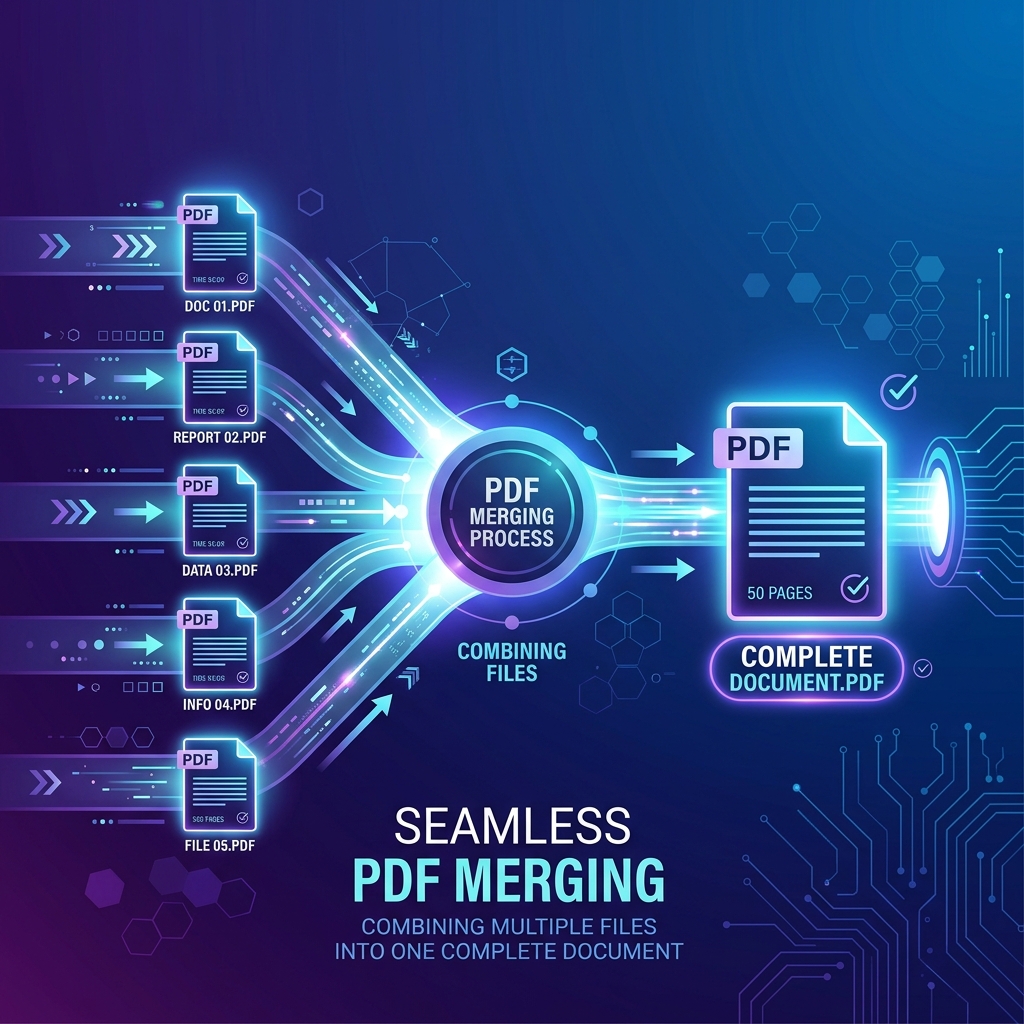
For both individuals and organizations, this reliability reduces communication errors, simplifies collaboration, and ensures that documents maintain a professional appearance throughout their entire lifecycle. If you need to combine multiple reports into a single file, our Merge PDF tool allows you to do so seamlessly.
💡 Did You Know?
The PDF format has become one of the world's most widely adopted document standards because it solves one simple but critical problem: ensuring that a document looks the same everywhere. Today, countless organizations use PDF for everything from invoices and tax forms to engineering drawings, healthcare records, and legal agreements. When security is paramount, you can protect sensitive files using our Protect PDF tool or add digital signatures with Sign PDF.
The History of PDF
Before PDF existed, sharing digital documents was surprisingly difficult.
During the late 1980s and early 1990s, documents were usually created using proprietary software. If the recipient didn't own the same application—or even the same version—the document could appear differently or fail to open entirely. Missing fonts, incompatible printers, and operating system differences often caused formatting problems that wasted time and created confusion.
Recognizing this challenge, Adobe introduced the Portable Document Format in the early 1990s as part of an initiative known internally as "The Camelot Project." The goal was ambitious: create a universal document format capable of preserving a document's appearance across every computer and printer.
The first official PDF specification was released in 1993 alongside Adobe Acrobat. Although early adoption was gradual due to limited internet speeds and expensive software, PDF steadily gained popularity as businesses recognized the benefits of consistent document exchange.
As the internet expanded, PDF became the ideal format for distributing digital documents. Governments published official forms, universities shared research papers, companies distributed product manuals, and publishers embraced PDF for electronic books and reports.
A major milestone occurred in 2008 when PDF became an open international standard under ISO 32000. This transition allowed software developers around the world to build compatible PDF readers, editors, and processing tools without relying exclusively on Adobe technologies.
Today, PDF is supported by virtually every modern operating system, browser, office suite, printer, and mobile device. It has evolved into one of the most trusted and enduring digital document standards ever created.
PDF Timeline
| Year | Milestone |
|---|---|
| 1991 | Adobe begins the Camelot Project. |
| 1993 | PDF 1.0 and Adobe Acrobat are officially released. |
| Late 1990s | PDF adoption grows rapidly in business and publishing. |
| 2001 | Interactive forms and richer document features become more common. |
| 2008 | PDF becomes the international open standard ISO 32000. |
| Today | PDF is supported by nearly every modern operating system, browser, and business application. |
📌 Key Takeaways
- PDF was created to solve document compatibility problems.
- Its primary strength is preserving a document's appearance across platforms.
- Adobe introduced PDF in 1993 through the Camelot Project.
- Since 2008, PDF has been maintained as an open international standard (ISO 32000).
- PDF remains the preferred format for professional document sharing worldwide.
How PDF Files Work
At first glance, a PDF file may look like a simple digital document, but behind the scenes it is a carefully structured container designed to preserve every aspect of a document's appearance.
Unlike editable documents that rely on the software installed on your computer, a PDF contains nearly everything needed to display the document correctly. This includes text, fonts, images, vector graphics, page dimensions, hyperlinks, annotations, metadata, and other resources packaged together into a standardized file structure.
When you open a PDF, your PDF reader or web browser interprets this information and reconstructs the document exactly as it was created. Because the rendering instructions are stored within the file itself, the document appears almost identical on different operating systems and devices.
Think of a PDF as a digital snapshot of a document rather than a traditional editable file. Instead of asking your computer to recreate the document from editable elements, the PDF provides precise instructions for displaying every object in its intended position.
This architecture explains why PDFs are trusted for contracts, invoices, engineering drawings, legal documents, academic publications, and other files where formatting accuracy is essential.
🎯 Direct Answer
A PDF works by storing both the document's content and detailed rendering instructions inside a single standardized file. Any compatible PDF reader can interpret these instructions to reproduce the same document layout regardless of hardware, operating system, or installed software.
The Main Components of a PDF
Every PDF document is made up of several core components working together.
Text
PDF files store text along with information about its position, font, size, color, spacing, and formatting. This ensures that paragraphs remain exactly where they were placed by the document creator.
Fonts
Many PDF files embed fonts directly inside the document. If the recipient's computer does not have the required font installed, the embedded version is used automatically, preventing unexpected formatting changes.
Images
PDF documents can contain photographs, logos, icons, screenshots, scanned pages, and illustrations. Images are stored using different compression techniques depending on the required balance between quality and file size.
Vector Graphics
Unlike ordinary images, vector graphics remain perfectly sharp regardless of zoom level. This makes PDFs ideal for technical drawings, floor plans, engineering diagrams, company logos, charts, and infographics.
Metadata
Most PDF files also contain hidden information known as metadata. Typical metadata includes document title, author, subject, keywords, creation date, modification date, software used, and PDF version. Metadata helps organize documents and improves searchability.
Interactive Elements
Modern PDF files may also include hyperlinks, fillable forms, checkboxes, radio buttons, drop-down menus, bookmarks, comments, sticky notes, and attachments. These features transform PDFs from static documents into interactive digital experiences.
How a PDF Is Displayed
When you open a PDF document, the viewing software follows a series of steps:
- Reads the file structure.
- Loads embedded fonts.
- Decodes images.
- Draws vector graphics.
- Places every element at its exact coordinates.
- Applies colors and transparency.
- Displays interactive components.
- Renders the finished page.
Because every compatible PDF viewer follows the same specification, the final result remains highly consistent across devices.
Why PDF Files Look the Same Everywhere
One of the biggest advantages of PDF is presentation consistency. Traditional editable documents depend on the recipient's computer having compatible software, fonts, and page settings. PDF eliminates these dependencies by packaging everything required to display the document correctly inside the file whenever possible.
This consistency is particularly important for legal agreements, business contracts, financial reports, academic papers, government forms, product manuals, and marketing brochures.
💡 Pro Tip
If you need to send a document that must look exactly the same on every device, save or export it as a PDF before sharing it. This helps prevent formatting issues caused by missing fonts, different software versions, or printer settings. Need to organize your document pages before sending? Try our Organize PDF tool.
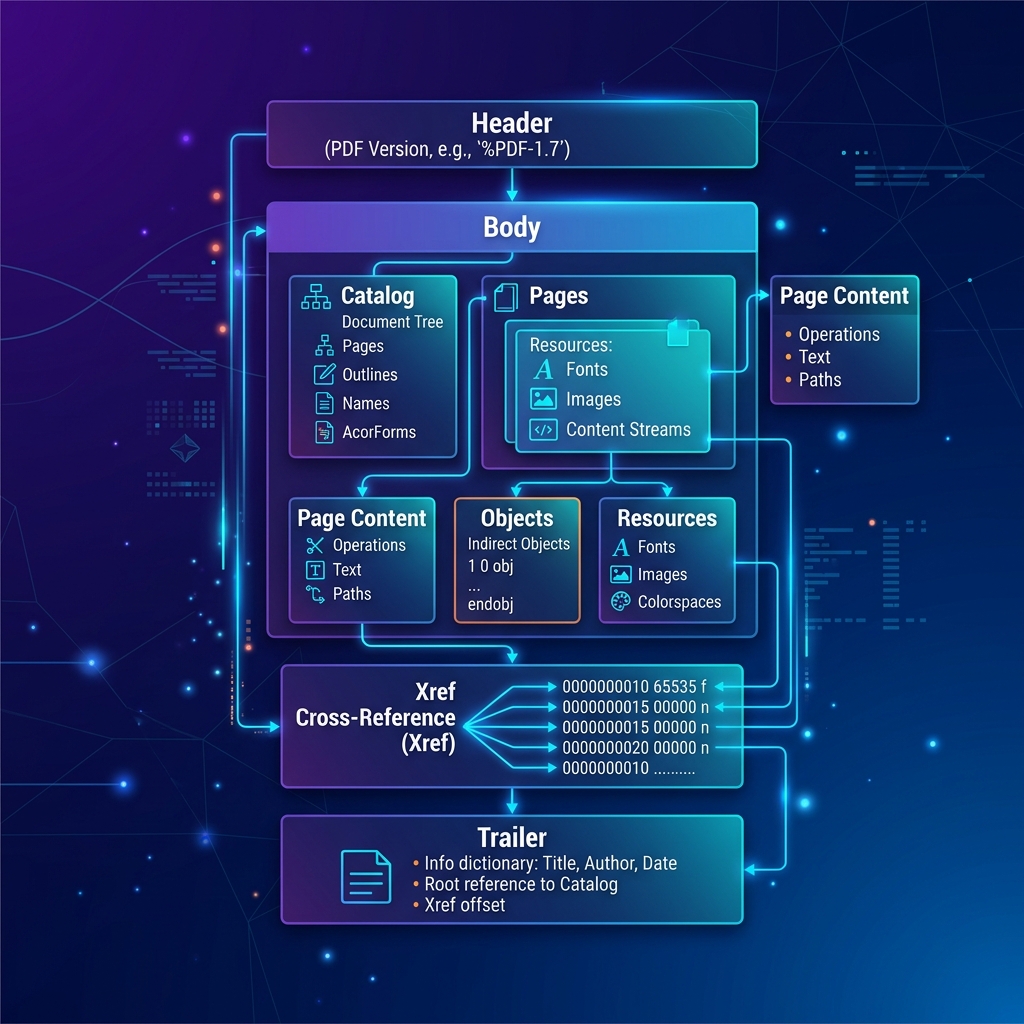
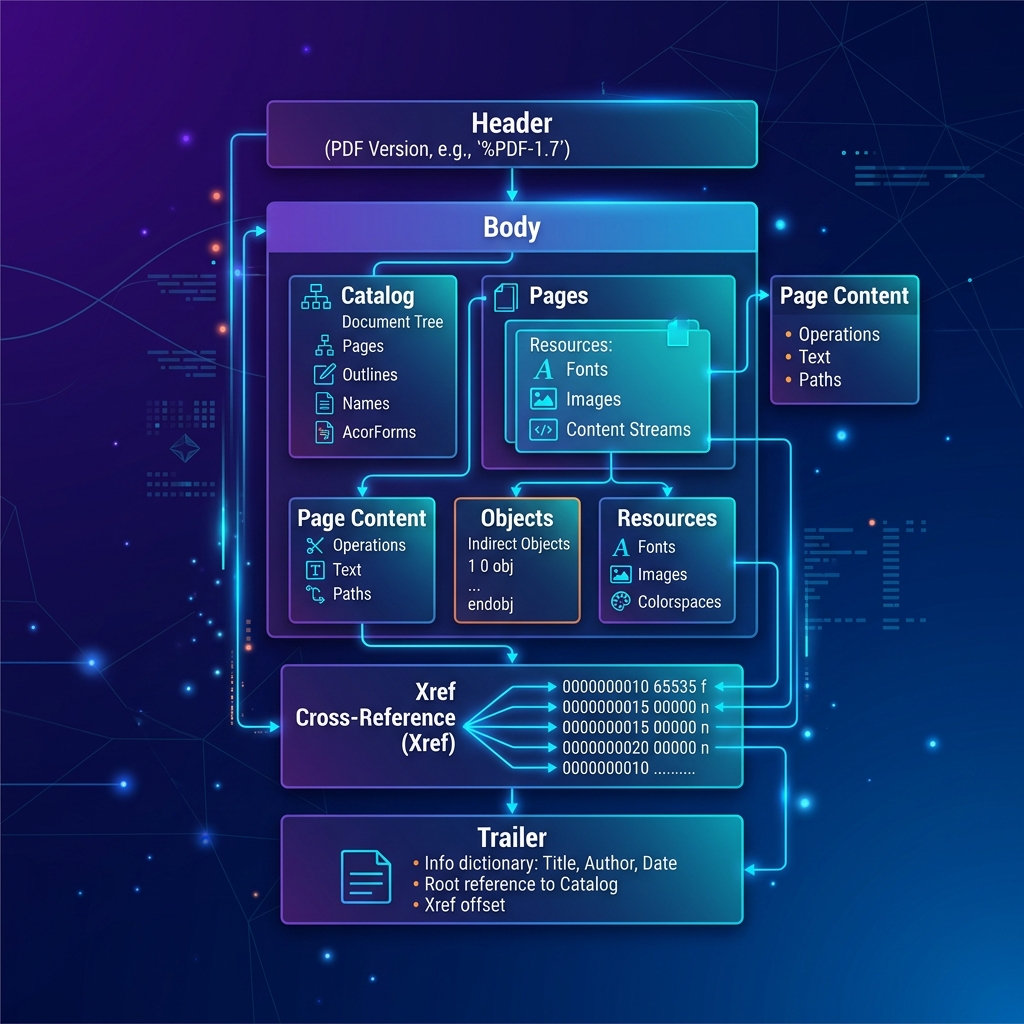
Inside a PDF File
Although PDF files appear simple from the outside, their internal structure is highly organized. A typical PDF consists of several logical sections that allow software to locate pages, objects, fonts, and other resources efficiently.
| Section | Purpose |
|---|---|
| Header | Identifies the PDF version. |
| Body | Stores pages, text, images, fonts, and objects. |
| Cross-Reference Table | Helps software locate objects quickly. |
| Trailer | Points to the document's root structure and metadata. |
This organized design allows even very large PDF documents to be opened quickly without reading the entire file from beginning to end.
💡 Did You Know?
Many PDF readers do not load every page immediately. Instead, they load only the information required for the pages currently being viewed, making large documents feel much faster to navigate.
Why PDF Became an Industry Standard
PDF became the global standard because it solved several long-standing document sharing problems simultaneously. Instead of requiring identical software, fonts, and operating systems, PDF offered a universal format that worked almost everywhere.
Organizations quickly adopted PDF because it provided:
- Consistent document appearance.
- Reliable printing.
- Long-term document preservation.
- Cross-platform compatibility.
- Strong security features (try Protect PDF).
- Professional presentation.
- Support for digital signatures (try Sign PDF).
- Efficient file compression (try Compress PDF).
Today, PDFs are used daily by governments, universities, hospitals, banks, law firms, manufacturers, publishers, and millions of individuals worldwide. The format continues to evolve while maintaining excellent backward compatibility, making it one of the most durable document standards ever created.
📌 Key Takeaways
- PDF stores both content and display instructions.
- Embedded fonts help preserve formatting.
- Metadata improves document organization.
- Interactive elements make PDFs more than static documents.
- The standardized structure enables reliable viewing across devices.
- Cross-platform compatibility is a major reason for PDF's global adoption.
Advantages of PDF Files
PDF has remained the world's preferred document format for decades because it combines reliability, compatibility, and security in a single file type. Whether you're sharing a résumé, signing a contract, publishing a report, or archiving important records, PDF offers several advantages that other document formats cannot always guarantee.
Below are the most significant benefits of using PDF files in both personal and professional environments.
Consistent Formatting
Perhaps the greatest advantage of PDF is that it preserves a document's appearance regardless of where it is opened. Fonts, margins, spacing, images, tables, and page layouts remain consistent across different operating systems, devices, and PDF readers. For businesses, this consistency reduces misunderstandings and eliminates formatting issues that often occur with editable document formats.
Cross-Platform Compatibility
PDF files can be viewed on virtually every modern operating system including Windows, macOS, Linux, Android, and iOS. Most modern web browsers also include built-in PDF viewers, allowing users to open documents without installing additional software.
Excellent Print Quality
PDF was designed with professional printing in mind. Unlike some editable formats, PDF maintains page dimensions, typography, image positioning, and color information during printing, making it ideal for books, brochures, flyers, certificates, contracts, and business reports.
Better Security
PDF includes several security features that help protect sensitive information. Depending on how the document is created, it may support password protection, encryption, permission controls, digital signatures, and certificate validation. Protect sensitive documents using our Protect PDF tool or apply legal electronic signatures with Sign PDF.
Smaller File Sizes
Modern PDF compression techniques can significantly reduce file size while maintaining acceptable visual quality. Smaller files are easier to email, upload, download, and archive. If a document becomes too large, tools such as our free Compress PDF can reduce its size without noticeably affecting readability.
Long-Term Preservation
Many organizations archive documents for years or even decades. Because PDF is an internationally standardized format (ISO 32000), documents created today are far more likely to remain readable in the future than files saved in proprietary formats. Specialized archival standards such as PDF/A were developed specifically for long-term digital preservation.
Interactive Features
Modern PDFs are no longer limited to static pages. They may include fillable forms, hyperlinks, bookmarks, comments, electronic signatures, attachments, and embedded multimedia. Need to organize or reorder your PDF pages? You can easily use our Organize PDF tool.
Accessibility Support
Properly created PDF files can be accessible to users with disabilities. Accessibility features include tagged document structure, alternative text for images, reading order, keyboard navigation, and screen reader compatibility.
Summary of Advantages
| Advantage | Why It Matters |
|---|---|
| Consistent Formatting | Documents appear the same everywhere. |
| Cross-Platform Support | Works on nearly every device. |
| Professional Printing | High-quality printed output. |
| Security Features | Passwords, encryption, and signatures. |
| Compression | Smaller files for sharing and storage. |
| Long-Term Archiving | Reliable preservation for years. |
| Interactive Elements | Forms, links, comments, and signatures. |
| Accessibility | Better usability for all users. |
💡 Pro Tip
If you're sending an important document to someone else, exporting it as a PDF is usually the safest choice because it minimizes unexpected formatting changes and ensures a consistent viewing experience.
Disadvantages of PDF Files
Although PDF offers many benefits, it is not always the perfect format. Understanding its limitations helps you choose the right document type for each situation.
Difficult to Edit
Unlike editable word-processing documents, PDFs are generally intended for final distribution. Making significant changes often requires specialized PDF editing software or converting back to an editable format using tools like PDF to Word and back with Word to PDF.
Large Files with High-Resolution Images
Scanned documents and image-heavy PDFs can become very large. Without compression, these files may be difficult to email or upload. Fortunately, modern compression tools like Compress PDF can reduce file size while preserving acceptable quality.
Some Interactive Features Depend on the Viewer
Not every PDF reader supports advanced features equally. Interactive forms, multimedia content, and certain digital signature functions may behave differently depending on the software being used.
Accessibility Depends on Proper Authoring
A PDF is not automatically accessible. If the document creator does not include proper tags, reading order, and alternative text, assistive technologies may struggle to interpret the content correctly.
Editing Can Affect Formatting
Converting PDFs back into editable formats such as Word may introduce formatting differences, particularly in complex documents containing tables, graphics, or custom fonts.
Summary of Disadvantages
| Limitation | Explanation |
|---|---|
| Editing | Requires specialized tools. |
| Large Scanned Files | May need compression. |
| Viewer Differences | Some features vary between readers. |
| Accessibility | Depends on proper document creation. |
| Conversion Issues | Formatting may change after editing. |
Common Uses of PDF Files
Today, PDF is used across virtually every industry. Some of the most common applications include:
- Business: Contracts, invoices, financial reports, company policies, and presentations.
- Education: Research papers, assignments, lecture notes, certificates, and eBooks.
- Government: Official forms, tax documents, regulations, and public records.
- Healthcare: Medical reports, patient forms, and insurance documents.
- Engineering & Architecture: Technical drawings, blueprints, and specifications.
- Legal: Court documents, agreements, signed contracts, and evidence files.
💡 Did You Know?
Many governments around the world require official forms to be submitted in PDF format because the layout remains consistent regardless of the applicant's computer or software.
📌 Key Takeaways
- PDF provides consistent formatting across all major platforms.
- Security features help protect confidential documents.
- Compression makes files easier to share.
- PDFs are ideal for long-term document preservation.
- Editing is possible but generally requires specialized tools.
- PDF remains the preferred format for business, education, healthcare, legal, and government documents.
PDF vs Microsoft Word
Although PDF and Microsoft Word documents are often used for similar purposes, they serve different roles throughout a document's lifecycle.
A Microsoft Word document is primarily designed for creating and editing content. A PDF, on the other hand, is intended for sharing, printing, and preserving the final appearance of that content.
Choosing the correct format depends on what you want to accomplish. If a document still requires collaboration, revisions, or comments, Word is usually the better choice. Once the document is finalized and ready to distribute, converting it using our Word to PDF tool is generally the recommended approach.
Comparison Table
| Feature | Microsoft Word | |
|---|---|---|
| Editing | Limited without specialized tools | Fully editable |
| Layout Consistency | Excellent | May change between devices |
| Printing | Excellent | Depends on installed fonts and settings |
| Sharing | Excellent | Good |
| File Security | Passwords, encryption, digital signatures | Basic protection options |
| Cross-Platform Compatibility | Excellent | Requires compatible software |
| Professional Distribution | Excellent | Moderate |
When Should You Use Word?
- Writing reports
- Drafting documents
- Team collaboration
- Editing content
- Creating templates
When Should You Use PDF?
- Contracts
- Invoices
- Official forms
- Manuals
- Resumes
- Brochures
- Reports
- Academic papers
PDF vs JPG
Although both formats can display visual information, they are designed for completely different purposes. A JPG file stores a single compressed image, whereas a PDF file can contain multiple pages, searchable text, vector graphics, forms, hyperlinks, metadata, and interactive elements. If you have images you want to turn into a document, try our JPG to PDF converter.
Comparison Table
| Feature | JPG | |
|---|---|---|
| Multiple Pages | ✔ | ✘ |
| Searchable Text | ✔ | ✘ |
| Image Quality | Excellent | Depends on compression |
| Editable Content | Limited | No |
| Interactive Elements | ✔ | ✘ |
| Printing | Excellent | Good |
| File Size | Variable | Usually smaller for single images |
If your goal is to share a document, PDF is almost always the better choice. If you need to convert pages into images, use PDF to JPG.
PDF vs PNG
PNG is another popular file format, but it is designed specifically for images rather than complete documents. PNG supports lossless image compression and transparency, making it ideal for graphics, logos, icons, and interface elements. PDF is the better choice whenever the content includes multiple pages, formatted text, forms, or printable documents.
Comparison Table
| Feature | PNG | |
|---|---|---|
| Multi-page Support | ✔ | ✘ |
| Searchable Text | ✔ | ✘ |
| Transparency | Limited | ✔ |
| Printing | Excellent | Good |
| Best For | Documents | Graphics |
How to Open PDF Files
Opening a PDF file is simple because nearly every modern operating system includes built-in support. You can open PDF files using any modern web browser, built-in operating system viewers, dedicated PDF readers, or mobile applications.
How to Create PDF Files
There are several ways to create a PDF document:
- Saving a document as PDF from a word processor.
- Printing to a virtual PDF printer.
- Exporting from design software.
- Converting images with JPG to PDF or Word files with Word to PDF.
How to Edit PDF Files
Although PDF was designed primarily for sharing finished documents, many PDFs can still be edited. Typical editing tasks include adding text, removing pages with Remove Pages, reordering pages, rotating pages with Rotate PDF, filling forms, inserting images, adding signatures with Sign PDF, and applying watermarks with Watermark PDF.
If you need to edit complex text blocks, convert the file to Word first using PDF to Word.
Best Practices
- Keep file sizes as small as possible using Compress PDF.
- Use descriptive filenames.
- Password-protect confidential documents using Protect PDF.
- Use digital signatures for official paperwork via Sign PDF.
- Preserve the original source file whenever possible.
- Verify formatting before printing.
Common Mistakes
- Sending editable documents instead of PDFs.
- Using scanned PDFs when searchable PDFs are available.
- Forgetting to compress very large files.
- Omitting password protection for sensitive information.
- Flattening forms before all required edits are complete.
- Converting documents repeatedly, reducing quality over time.
💡 Pro Tip
Whenever possible, keep an editable copy of your original document (such as a Word file) alongside the final PDF. This makes future updates much easier while preserving a polished version for sharing.
📌 Key Takeaways
- Word is best for creating and editing documents.
- PDF is best for sharing and preserving formatting.
- JPG and PNG are image formats, while PDF is a complete document format.
- Most devices can open PDFs without additional software.
- Following simple best practices helps maintain document quality and security.
Frequently Asked Questions (FAQ)
1. What does PDF stand for?
PDF stands for Portable Document Format. It is a universal file format designed to preserve the layout, fonts, images, and formatting of a document across different devices and operating systems.
2. Why are PDF files so popular?
PDF files are popular because they display consistently on almost every device, are easy to share, support security features, and maintain professional formatting when printed or viewed digitally.
3. Can I edit a PDF file?
Yes. Many PDF files can be edited using dedicated PDF editors or browser-based tools. Common editing tasks include adding text, removing pages with Remove Pages, rotating pages with Rotate PDF, merging documents with Merge PDF, and inserting signatures with Sign PDF.
4. Is a PDF better than a Word document?
Neither format is universally better—they serve different purposes.
Use Microsoft Word when creating or editing documents, and use PDF when you want to share or archive the final version while preserving its appearance.
5. Can PDF files contain images?
Yes. PDF documents can include:
- Images
- Charts
- Tables
- Logos
- Scanned pages
- Vector graphics
- Interactive forms
- Hyperlinks
6. Are PDF files secure?
They can be. Modern PDF documents support:
- Password protection via Protect PDF
- Encryption
- Permission controls
- Digital signatures via Sign PDF
- Certificates
However, the level of security depends on how the document is created and configured.
7. Why are some PDF files so large?
Large PDFs usually contain:
- High-resolution images
- Scanned pages
- Embedded fonts
- Large graphics
- Multiple pages
Compressing a PDF using Compress PDF can significantly reduce its file size while maintaining good readability.
8. Can I convert a PDF into another format?
Yes. PDF documents can often be converted into formats such as:
- Microsoft Word via PDF to Word
- Excel via PDF to Excel
- PowerPoint via PDF to PowerPoint
- JPG via PDF to JPG
- PNG via PDF to PNG
- Plain Text via PDF to Text
The quality of the conversion depends on the document's structure and content.
9. Do PDF files work on smartphones?
Absolutely. Modern Android and iPhone devices include built-in PDF viewing capabilities or support free PDF reader applications.
10. Can I sign a PDF electronically?
Yes. Electronic signatures have become a standard feature of modern PDF workflows and are widely used for contracts, agreements, invoices, and official documents. You can easily sign documents using our Sign PDF tool.
11. What is the difference between PDF and PDF/A?
PDF is the general-purpose document format. PDF/A is a specialized archival version of PDF designed for long-term document preservation by restricting features that may become unavailable in the future.
12. Is PDF an open standard?
Yes. Since 2008, PDF has been maintained as the international standard ISO 32000, allowing software developers worldwide to build compatible PDF applications.
Explore More PDF Tools
Looking to do more with your PDF files?
SmokePDF provides a growing collection of browser-based tools designed to help you manage documents quickly, securely, and entirely within your browser.
Popular tools include:
- Merge PDF — Combine multiple PDF files into one document.
- Split PDF — Separate pages or extract specific sections.
- Compress PDF — Reduce file size while keeping high quality.
- PDF to Word — Convert PDF files into editable Word documents.
- Word to PDF — Convert DOCX files to professional PDF format.
- PDF to JPG — Extract images or convert pages to JPG.
- JPG to PDF — Turn image files into a single PDF document.
- Protect PDF — Secure documents with password encryption.
- Sign PDF — Add digital or hand-drawn signatures.
- Organize PDF — Reorder, add, or delete pages effortlessly.
- Rotate PDF — Fix page orientation easily.
- Remove Pages — Delete unnecessary pages from a document.
- Extract Pages — Save specific pages as a new PDF.
- Compare PDF — Compare differences between two PDF documents.
- Watermark PDF — Add custom text or image watermarks.
- PDF Information — View metadata and document properties.
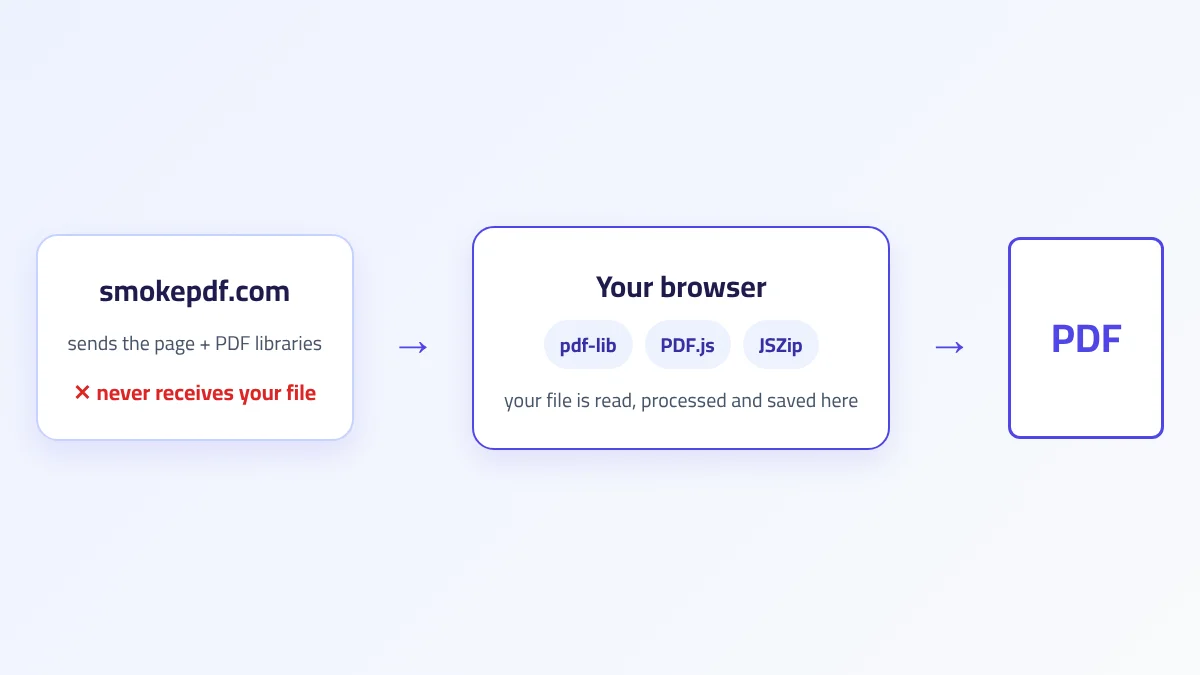
All tools are designed with privacy in mind, meaning your documents are processed locally in your browser whenever supported—helping keep your files under your control.
Conclusion
The Portable Document Format has transformed the way people create, share, and preserve digital documents. Its ability to maintain consistent formatting across platforms, combined with powerful security, accessibility, and compatibility features, has made it one of the most trusted document formats in the world.
Whether you're preparing a business proposal, submitting an academic paper, sharing a résumé, signing a contract, or archiving important records, PDF provides a dependable solution that works across devices and operating systems.
Understanding how PDF files work—and choosing the right tools to manage them—can save time, improve collaboration, and ensure your documents remain professional from creation to distribution.
As digital workflows continue to evolve, PDF remains an essential format for individuals, businesses, educational institutions, and governments alike.