When do you need to compress a PDF?
The problem usually shows up at upload time: a portal rejects anything over 2 or 5 MB, or an email bounces because the attachment is too large. Most of the time the file was scanned or photographed with a phone, so every page is a large image. Compression shrinks those images until the system accepts your file.
The two compression types
The tool offers two options, each suited to a different case:
- Lossless: rewrites the file's internal structure more compactly without touching text or images. Text stays selectable and searchable. It helps with files exported by software that writes a messy structure, but it has little effect on scans and sometimes changes nothing.
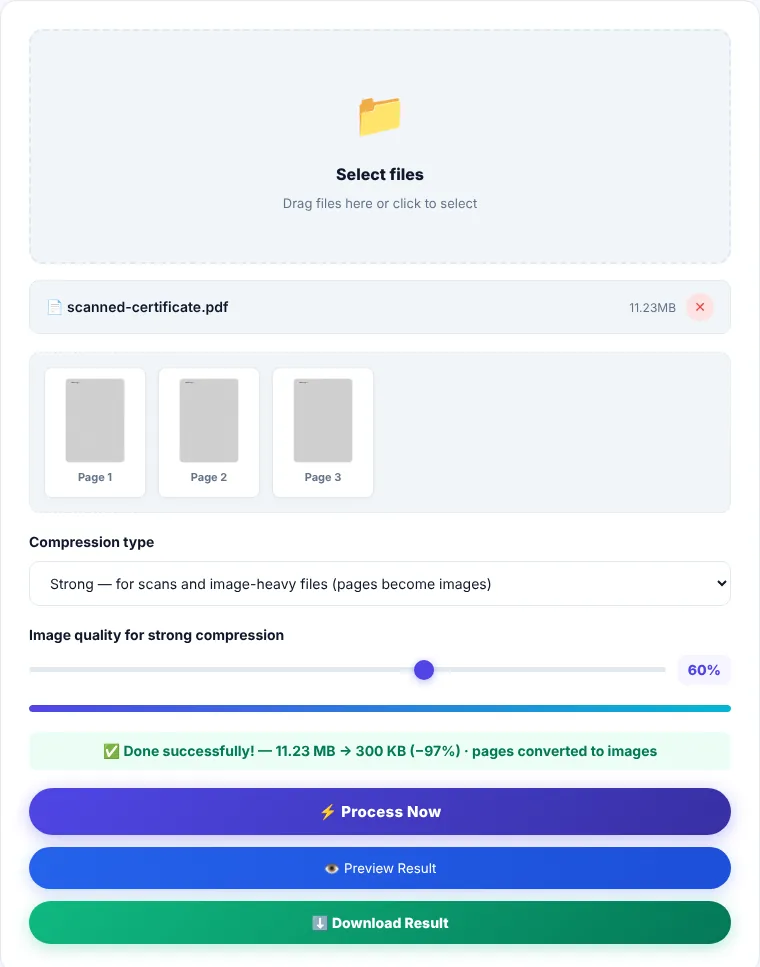
- Strong: re-draws every page as a JPEG at the quality you choose, then builds a new PDF from those images. This is the option that actually shrinks scanned files. The trade-off is that text becomes part of the image, so it can no longer be selected or searched.
If either option produces a file that is not smaller than the original, the tool gives you the original back and tells you so. You never end up with a bigger file than you started with.
How to compress a PDF
- 1Choose one PDF or drag it onto the box.
- 2Start with "Lossless". If the result is still above the limit you need, switch to "Strong".
- 3For strong compression, start at 60% quality. Lower it to 40% if you need a smaller file; raise it to 70% or more if small text becomes hard to read.
- 4Click "Process now". The result message shows the size before and after and the percentage saved. Preview the file, then download it as
compressed.pdf.
Tips for hitting a size limit
- Remove pages you don't need (a blank page, a duplicate scan) with Remove Pages first. Every deleted page reduces the size.
- Color scans where color doesn't matter (statements, ID copies) may get smaller after Grayscale PDF.
- If a single upload must stay under a limit but contains several documents, compress each one separately and then merge them, rather than compressing one huge file.
Limitations to keep in mind
- Strong compression is not suitable for a file whose text you'll need to copy later, or for an official contract that must stay searchable. Always keep the original.
- Password-protected files may not compress correctly. Remove the password first with Unlock PDF if you know it.
- Very large files are processed in your browser's memory and can be slow on older phones. A desktop computer is faster.
Where is the processing done?
Compression runs in your browser using pdf-lib and PDF.js, and your file is not sent to our servers. Once the page has loaded, you can disconnect from the internet and the tool keeps working.
Compress PDF: frequently asked questions
Why didn't lossless compression change the file size?
Because most of the file is images, and this option does not touch images. Use "Strong" for scans and image-heavy files.
Will the compressed file still be accepted by official portals?
Yes, the output is a standard PDF. Just check in the preview that numbers and stamps are still legible before you submit it.
What quality works for an ID copy or a certificate?
50–60% is usually enough to read text and stamps clearly. For detailed photos or technical drawings, use 70% or higher.
Can I compress several files at once?
The tool compresses one file at a time. If you need a single compressed file from several documents, combine them with Merge PDF first and compress the result.