When do you need to remove pages from a PDF?
A scanned file with blank sheets between pages, a report with appendices you don't want to send, or a copy of a contract where one page holds information that doesn't concern the recipient. Removing pages drops them and keeps everything else in one file, in the same order and quality.
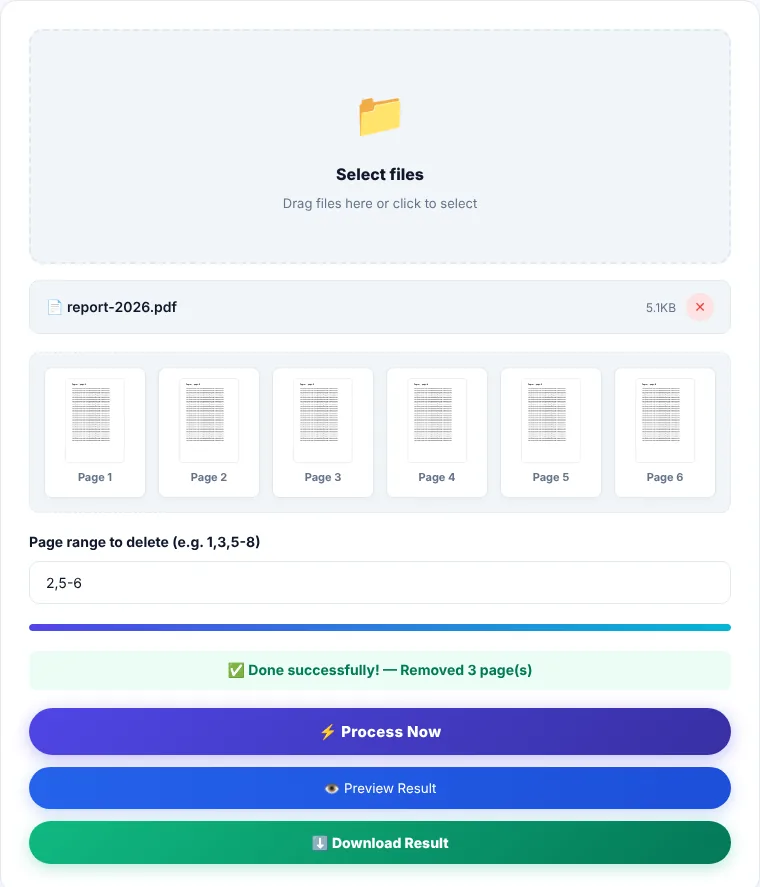
How to enter page numbers
The "Page range" field understands a flexible format:
3: removes page 3 only.1,4,9: removes scattered pages, separated by commas.5-8: removes a whole range, pages 5 through 8.1,3,10-12: combines both.
Numbering starts at 1 and follows the order of pages in the file, not the numbers printed at the bottom of the pages. If a book starts its numbering after the cover and contents, the page printed "1" may be page 5 in the file. Open the PDF in a reader and look at the page number the reader shows.
How to remove pages
- 1Choose a PDF or drag it onto the box.
- 2Enter the numbers of the pages you want to remove.
- 3Click "Process now". The result message tells you how many pages were removed.
- 4Preview the file to make sure the right pages are gone, then download it as
removed_pages.pdf.
Remove or extract?
If you only want to keep a few pages of a long file, it's easier to type what you keep rather than what you delete. Use Extract Pages for that. To cut a file into equal parts, use Split PDF.
Limitations
- You can't remove every page; the file must keep at least one.
- Numbers beyond the file's page count are ignored.
- Bookmarks (the side outline) are not carried into the new file.
- Removal deletes whole pages. To hide part of a page, such as an account number, you need a redaction tool, not page removal.
Where is the processing done?
Pages are removed in your browser using pdf-lib, and the file is not sent to our servers. We cover more cases in our guide How to Remove Pages from a PDF.
Remove Pages: frequently asked questions
Does the file get smaller after removing pages?
Usually yes, especially when the removed pages are scanned images. Light text pages save less.
Can I undo a removal?
The tool doesn't modify your original file; it creates a new copy. Your original stays untouched on your device.
How do I remove only the blank pages?
Preview the file, note the numbers of the blank pages, and enter them separated by commas.
I removed an important page by mistake. What now?
Go back to your original file and run it again with the right numbers. That's why we always recommend previewing before downloading.