When do you need to convert PDF to Word?
When you need to edit text that reached you as a PDF: an old résumé you want to update, a formal letter that needs a new date and name, or a report whose paragraphs you want to reuse in a new document. The conversion extracts the text and puts it into an editable Word file.
What exactly the tool carries over
It's worth knowing what to expect before converting, so the result doesn't surprise you:
- Text: extracted line by line in page order, with each PDF page starting on a new page in the Word document.
- Headings: the first short line of each page is treated as a bold heading.
- Direction: Arabic paragraphs are automatically set right-to-left.
- Not carried over: images, table layout, columns, colors and original fonts. The output is well-organized text in paragraphs, not a pixel-perfect copy of the page design.
That suits cases where the words matter more than the layout. If you need to preserve the design closely, desktop software that opens PDFs directly (such as recent versions of Word itself) may get closer.
How to convert PDF to Word
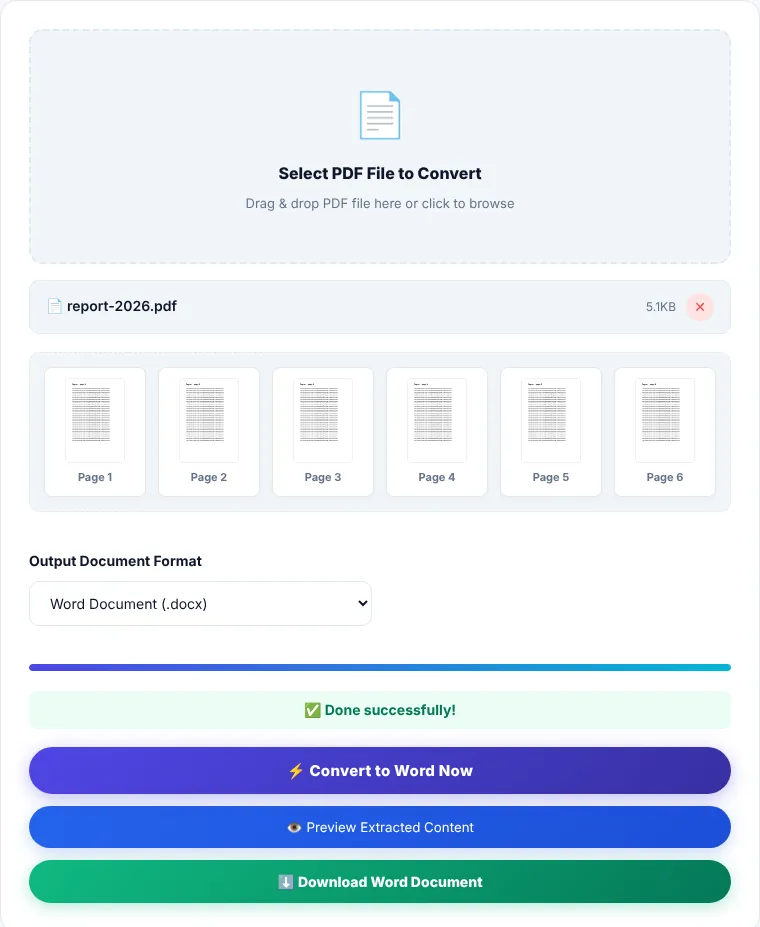
- 1Choose a PDF or drag it onto the box.
- 2Keep the format on "Word document (.docx)"; it opens cleanly in Word, Google Docs and LibreOffice. The .doc option is only for very old software.
- 3Click "Process now". The status line shows which page is being extracted.
- 4Preview the extracted text, then download the file. It keeps your original file name with a
.docxextension.
Scanned documents
If the file is made of page images (scanned or photographed), there is no text to extract, and the tool will tell you so. Such files need optical character recognition (OCR) first; we explain the difference in What Is OCR?. A quick check: open the file and try to select a word with your mouse. If you can't, it's a scan.
A note on Arabic and other right-to-left text
Some PDFs store right-to-left characters in display order rather than reading order, especially files exported from older or design software. In that case a few words may appear reversed or broken apart after conversion. This depends on how the original file was created and affects most converters. Try a short file first before converting a long document.
Where is the processing done?
Text extraction and building the Word file happen in your browser with PDF.js and JSZip. The file is not sent to our servers.
PDF to Word: frequently asked questions
Why doesn't the Word file look like the original PDF?
The tool carries over text, paragraphs and headings; it doesn't rebuild tables, images or columns. It's designed for recovering and editing content.
I got an empty file or a "no extractable text" message. Why?
The file is most likely scanned, meaning its pages are images. It needs OCR before it can become text.
Can I convert a password-protected file?
The tool can't read an encrypted file. Remove the password first with Unlock PDF if you know it.
How do I turn the document back into a PDF after editing?
Save it as PDF directly from Word for the best result, or use Word to PDF, which keeps the layout, tables and images.