When should you password-protect a PDF?
When you send a document with personal or financial details by email or chat: a payslip, a passport copy, a contract, or a medical report. A password keeps the file closed to anyone who gets it by mistake, for example when an email is forwarded or a device is shared.
What the tool does
The tool adds an open password to the file: any PDF reader (Adobe Reader, Chrome, your phone's Files app) asks for it before showing a single page. The content is encrypted inside the file, so it can't be read by opening it in a text editor or renaming it.
This is standard PDF password protection, which is enough for most everyday uses. For highly sensitive documents (trade secrets, critical legal files), use software that lets you explicitly choose AES-256 encryption, or send the file through an end-to-end encrypted service.
How to protect a PDF
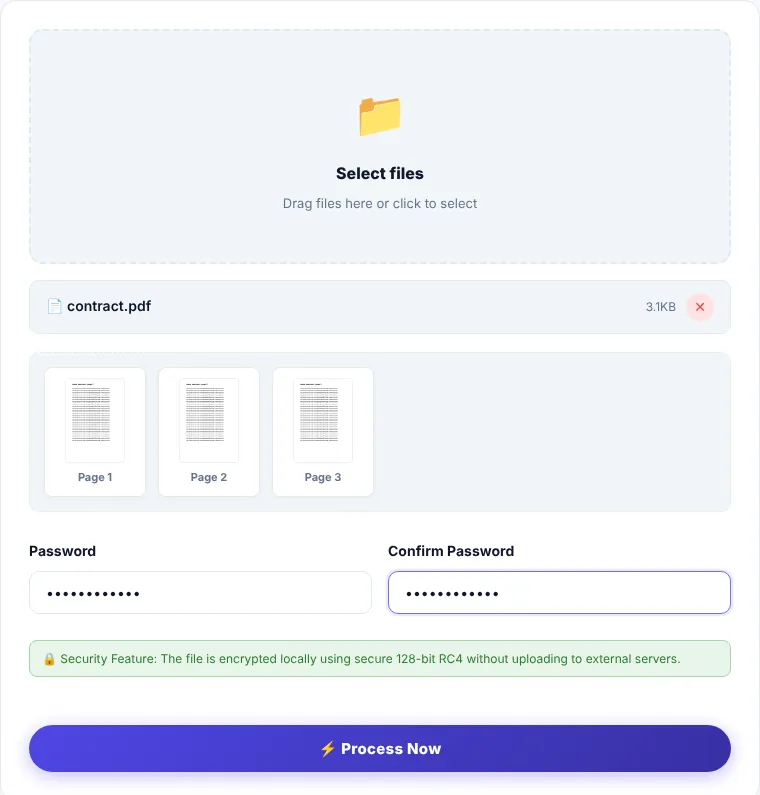
- 1Choose a PDF or drag it onto the box.
- 2Type the password in the first field and again in the confirmation field. They must match and be at least 4 characters long.
- 3Click "Process now".
- 4Download
protected.pdfand open it once to confirm it asks for the password before you send it.
Choosing a good password and sharing it safely
- The tool's minimum is 4 characters, but 10 or more mixing letters and numbers is far better. Something like "2026" can be guessed in seconds.
- Don't send the password in the same message as the file. Email the file and send the password by text message or tell it in a call.
- Store the password somewhere safe. If you forget it, it can't be recovered: we never have it, and there's no way to open the file without it. Always keep an unprotected copy yourself.
Limitations
- It adds an open password only; it doesn't set separate permissions (such as allowing opening while blocking printing or copying).
- An already protected file must be unlocked with Unlock PDF before you set a new password.
- The encryption library is downloaded when you click "Process now", so the tool needs an internet connection at that moment.
Where is the processing done?
Encryption happens in your browser. Neither the file nor the password is sent to our servers, and we keep neither.
Protect PDF: frequently asked questions
I forgot the password. Can you help?
No. The password never reaches us and no copy of it exists. The only way out is the original unprotected file, if you kept it.
Does a protected PDF open on a phone?
Yes. PDF apps on Android and iPhone ask for the password and then show the file normally.
Does protection change the file size or quality?
Quality doesn't change, and the size stays very close to the original.
How do I remove the password later?
Use Unlock PDF with the correct password to get an unprotected copy.